Windows SmartScreen Notice
When installing PumpIQ, Windows or Microsoft Edge may display a security warning. Follow these step-by-step visual guides to complete your download and installation safely.
Step-by-Step Visual Guides
Follow these quick instructions to complete your download and installation.
Scenario 1: Microsoft Edge Warning (When Downloading Installer)
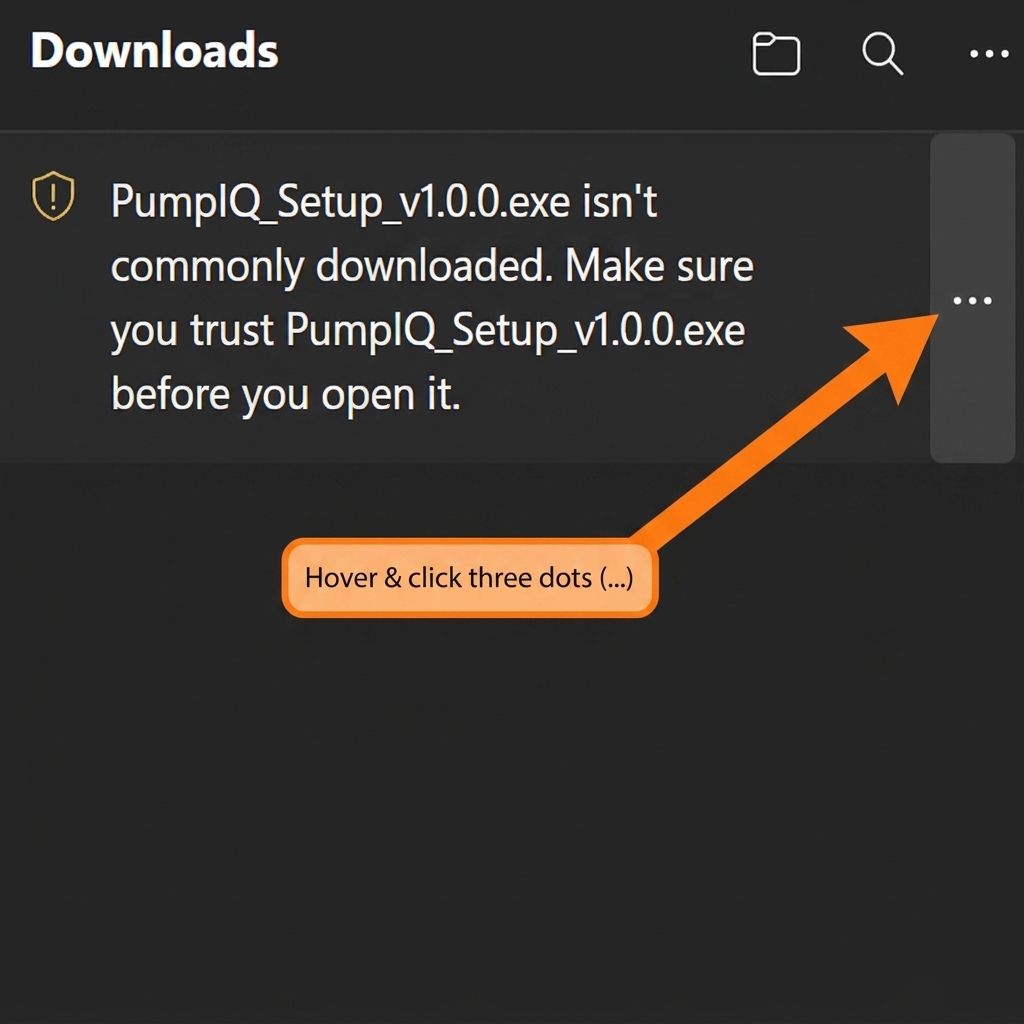
1. Click the Three Dots (...)
Hover over the blocked download message and click the options button on the right.
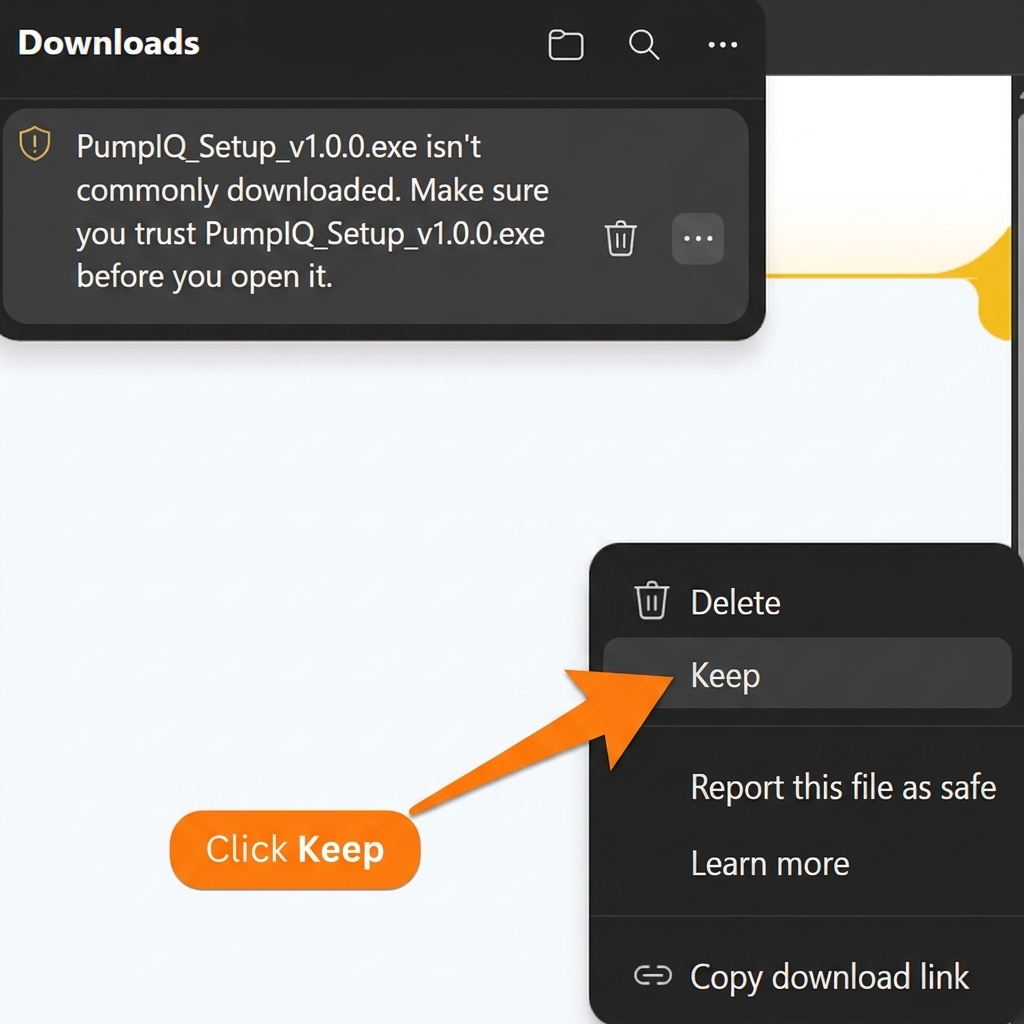
2. Click "Keep"
Select "Keep" from the popup menu (and then select "Keep anyway" if Edge prompts again) to finish downloading.
Scenario 2: Windows SmartScreen Warning (When Opening Installer)
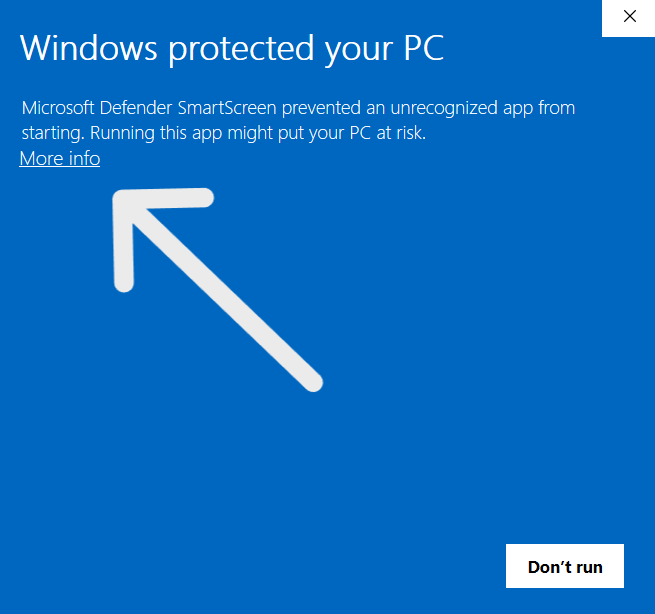
1. Click "More info"
This reveals the hidden installation action buttons.
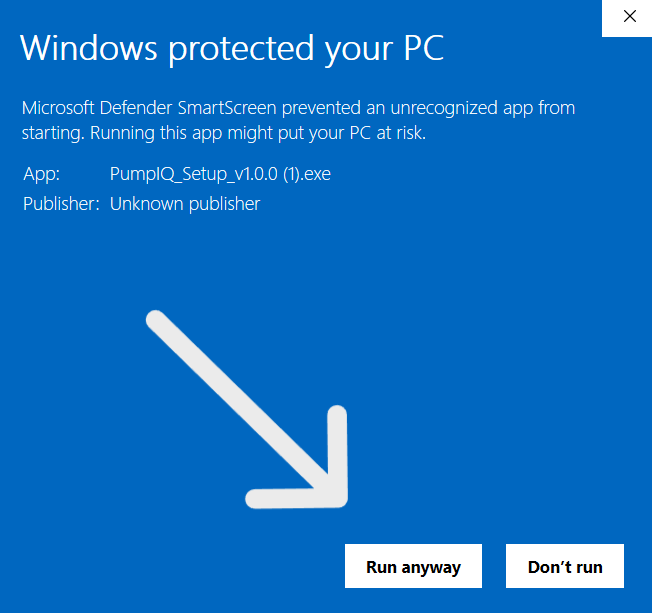
2. Click "Run anyway"
This starts the safe, verified PumpIQ setup assistant.
Security Assurance
PumpIQ takes your security seriously.
Verified. Safe. Official.
- PumpIQ is distributed exclusively through pumpiq.co.in and GitHub Releases. No third-party download sites are used or endorsed.
- The installer file has not been modified from the version published by the developer and is served only through the official channels listed above.
- PumpIQ does not collect personal data without your consent, does not include adware, bundleware, or cryptocurrency miners.
- Future releases will be digitally signed with a code-signing certificate, which will eliminate the SmartScreen warning entirely.
Frequently Asked Questions
Common questions about PumpIQ and the SmartScreen warning.
Is PumpIQ a virus or malware?
No. PumpIQ is legitimate petrol pump management software built in India. SmartScreen warnings appear for any newly released application, regardless of whether it is safe or malicious. The warning is based purely on download count, not on actual virus scanning.
Why am I seeing the "Windows protected your PC" message?
Windows SmartScreen builds a reputation score for every executable file based on the number of times it has been downloaded globally. Because PumpIQ is a new application, it has not yet accumulated enough downloads to pass this threshold automatically. Once enough users have installed it, the warning will stop appearing.
Why is Microsoft Edge blocking or warning me about downloading PumpIQ?
Microsoft Edge uses SmartScreen protection built directly into the browser. Just like Windows Defender, it flags newly released files that haven't built up download reputation yet. To complete the download, hover over the blocked file in the downloads list, click the three dots (...), and select "Keep". Refer to the Edge scenario tab above for a step-by-step visual guide.
Is it safe to click "Run anyway"?
Yes — provided you downloaded the installer from pumpiq.co.in or the official GitHub Releases page. Downloads are served directly from those official sources, so the file you receive is exactly the one we published.
Will this warning disappear in future versions?
Yes. Future releases will include a code-signing certificate from a trusted Certificate Authority. A signed installer is recognised by SmartScreen immediately, eliminating the warning entirely. Until then, the steps above remain the safe path to installation.
My antivirus flagged the installer. Should I be worried?
PumpIQ is packaged using PyInstaller, which bundles a Python interpreter inside the executable. Some antivirus programs flag PyInstaller-built applications with a heuristic (false positive) detection because the same bundling technique is occasionally used by malware. If you have concerns, contact support@pumpiq.co.in.
Where can I report a security concern?
Email us at support@pumpiq.co.in. We take all security reports seriously and respond within 24 hours.
Ready to get started?
Download the free 7-day trial and modernize your petrol pump today.